Style Guide Documentation
about
Boat Deck is a full service marine website design firm headquartered in Sydney, Australia. We design sites for dealers, manufacturers, charter companies and marine online stores.
At Boat Deck we use the latest programming and web design techniques to create an optimal, engaging online experience for every client via our comprehensive marine web systems, Web and Graphic Design and E-Commerce solutions.
Our team of talented and creative web designers and developers are ready to partner with you to deliver effective website solutions that helps your marine business to expand and flourish.
Each Boat Deck website comes with some amazing features to help connect you to new and current customers through multiple channels including the latest social media sites such as Twitter and Facebook.
Foundation
colors
Primary Color
The Primary Palette should be used in all occasions for Boatdeck marketing communications. The palette has been designed to give a bold and exciting direction to the brand, offering flexibility in the design of an literature off and online. Percentage tints can be used of any of these colours.
Color use at website
Shade of Gray
A selection of grayscale colors for background or text color use.
logo & favicon
Master Logo
The Boatdeck master logo should be used at all times. Where not possible, one of the logo variations should be used (see below). This is to make sure the logo and brand are used in a consistent manner across all communications.








Favicon
This favicon can be used as a web favicon and a web app favicon. Please download the whole package and pick the one that suit your needs.


Spacing & Sizing
The Boatdeck logo should always be surrounded by a minimum area of space. The area of isolation ensures that headlines, text or other visual elements do not encroach on the logo.
The area is defined by using the height of "t" of the Boatdeck logo. A margin of clear space equivalent to this height is drawn around the logo to create the invisible boundary of the area of isolation.

typography
Font Families
Our font families should be used for all communications. This to ensure the consistent look and feel of all literature off and online.
Roboto should be used for all header and sub header text, where Lato should be used for all other copy (body, quotes etc). To ensure a consistent look, make sure fonts are used in a consistent manner and the weights of the font have been considered, using heavier weights for headers and the highlight key messages.
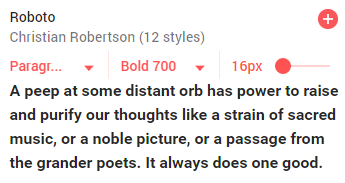
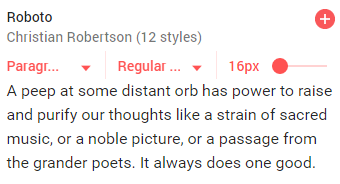
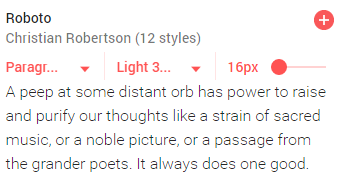
Heading Styles & Body Text
Color: #00FECE
Background: #FFF
Font: Roboto
Size: 60px
Line height: 1.4
Weight: 700
Heading 1
Color: #00FECE
Background: #FFF
Font: Roboto
Size: 48px
Line height: 1.4
Weight: 100
Heading 2
Color: #222222
Background: #FFF
Font: Roboto
Size: 16px
Line height: 1.6
Weight: 300
Body Text
Lorem ipsum dolor sit amet, consectetur adipisicing elit. Vero blanditiis corporis iusto minus veniam beatae doloremque aliquam molestiae distinctio fugiat!
Base Styles
Email Signature
address
Example
|


Usage Notes
This is how the element is used:
<!DOCTYPE html PUBLIC "-//W3C//DTD XHTML 1.0 Transitional//EN" "http://www.w3.org/TR/xhtml1/DTD/xhtml1-transitional.dtd">
<html xmlns="http://www.w3.org/1999/xhtml">

<head>
    <meta name="viewport" content="width=device-width">
    <meta http-equiv="Content-Type" content="text/html; charset=UTF-8">
    <link href="https://fonts.googleapis.com/css?family=Roboto" rel="stylesheet">
</head>
<body>
    <br>
    <table width="100%"  style="font-family:'Roboto',sans-serif; border: 0; cellpadding: 0; cellspacing: 0;" border="0" cellpadding="0" cellspacing="0">
        <tr style="border: 0; box-sizing: border-box; cellpadding: 0; cellspacing: 0; line-height: 20px;">
            <td style="padding:0px;">
                <table width="100%" style="border: 0; cellpadding: 0; cellspacing: 0;" border="0" cellpadding="0" cellspacing="0">

                    <!-- NAME -->
                    <tr style="box-sizing: border-box; line-height: 20px;">
                        <td align="left" style="text-align: left; color:#1d2c32;">
                            <p style="color:#1d2c32; margin-bottom:0px; font-weight: bold; font-size: 12pt"> Rebecca Jones </p>
                            <p style="text-transform:uppercase; margin-top:0; font-size: 10pt; margin-bottom: 5px;"> DIRECTOR </p>
                        </td>
                    </tr>

                    <tr style="box-sizing: border-box; line-height: 20px;">
                        <!-- AGENTPOINT AGENT -->
                        <table class="footer__main__col1" width="80%" align="left" style="text-align: left; border: 0; cellpadding: 0; cellspacing: 0;" border="0" cellpadding="0" cellspacing="0">
                            <td class="col1-td" align="left" style="text-align: left; color: #ff9e00;">
                                <p style="margin-top:5px; margin-bottom: 0px;">
                                    <img style="vertical-align:middle; width:16px; height: auto; margin-right: 0px; display: inline-block;" src="https://netpoint.group/wp-content/uploads/2017/03/sign-email-boatdeck.png" alt="email" title="email"><a href="mailto:rebecca@marinewebsite.com.au" style="color:#004e86; text-decoration:none; font-size: 10pt;"> rebecca@marinewebsite.com.au
                                    </a>
                                </p>
                                <p style="margin-top:5px; margin-bottom: 0px;">
                                    <img style="vertical-align:middle; width:16px; height: auto; margin-right: 0px; display: inline-block;" src="https://netpoint.group/wp-content/uploads/2017/03/sign-phone-boatdeck.png" alt="phone" title="phone"> <a href="tel:612999995242" style="color:#004e86; text-decoration:none; font-size: 10pt;"> (61) 2 9999 5242 </a>
                                </p>
                                <p style="margin-top:5px; margin-bottom: 0px;">
                                    <img style="vertical-align:middle; width:16px; height:auto; margin-right: 0px; display: inline-block;" src="https://netpoint.group/wp-content/uploads/2017/03/sign-website-boatdeck.png" alt="website" title="website"> <a href="http://boatdeck.com.au/" style="color:#004e86; text-decoration:none; font-size: 10pt;"> www.boatdeck.com.au </a>
                                </p>
                                <p style="margin-top:5px; margin-bottom: 15px;">
                                    <img style="vertical-align:middle; width:16px; height:auto; margin-right: 0px; display: inline-block;" src="https://netpoint.group/wp-content/uploads/2017/03/sign-website-boatdeck.png" alt="marine" title="marine"> <a href="http://www.marinewebsites.com.au/" style="color:#004e86; text-decoration:none; font-size: 10pt;"> www.marinewebsites.com.au </a>
                                </p>
                            </td>
                        </table>

                        <!-- AGENPOINT LOGO -->
                        <table class="col2" width="20%" align="right" style="text-align: right; border: 0; cellpadding: 0; cellspacing: 0;" border="0" cellpadding="0" cellspacing="0">
                            <td class="col2-td" align="right" style="color: #9a9a9a; font-size: 14px;">
                                <p style="margin-top: 0px;">
                                    <a href="http://boatdeck.com.au/">
                                        <img class="col2-td-img" src="https://netpoint.group/wp-content/uploads/2017/03/boatdeck-netpoint.png" alt="logo" title="logo" style="width: 150px; height: auto !important; max-height: none !important; display: block;">
                                    </a>
                                </p>
                            </td>
                        </table>

                        <!-- SOCIAL MEDIA -->
                        <table class="footer" width="100%" align="right" style="text-align:right;border: 0;cellpadding: 0;cellspacing: 0; background-color: #004e86"; border="0" cellpadding="0" cellspacing="0">
                            <td align="right" style="text-align: left; width:50%; background-color: #004e86">
                                <div style="text-align:left; padding-left:10px; padding-top: 0; padding-bottom: 0; color:#fff; font-size: 10pt;">

                                </div>
                            </td>
                            <td align="right" style="text-align: right; width: 50%; background-size: cover; background-repeat: no-repeat; background-image: url('https://netpoint.group/wp-content/uploads/2017/03/line_boatdeck.png');" class="sosmed">
                                <div style="text-align:right; padding-bottom:0px; padding-top: 4px;">
                                    <!-- facebook -->
                                    <span style="width: 20px; display: inline-block; margin-right: 10px;">
                                        <a href="https://business.facebook.com/boatdeckmarinewebsites" target="_blank"><img style="width: 8px; height:auto; display: block;" alt="facebook" title="facebook" src="https://netpoint.group/wp-content/uploads/2017/03/sign-facebook.png"></a>
                                    </span>
                                    <!-- twitter -->
                                    <span style="width: 20px; display: inline-block; margin-right: 10px;">
                                        <a href="https://twitter.com/boatdeck" target="_blank"><img style="width: 14px; height:auto; display: block;" title="twitter" alt="twitter" src="https://netpoint.group/wp-content/uploads/2017/03/sign-twitter.png"></a>
                                    </span>
                                    <!-- G+ -->
                                    <span style="width: 20px; display: inline-block; margin-right: 10px;">
                                        <a href="https://plus.google.com/b/107721925883403369095/107721925883403369095/about" target="_blank"><img style="width: 15px; height: auto; display: block;" title="gplus" alt="gplus" src="https://netpoint.group/wp-content/uploads/2017/03/sign-gplus.png"></a>
                                    </span>
                                    <!-- Youtube -->
                                    <span style="width: 20px; display: inline-block; margin-right: 10px;">
                                        <a href="https://www.youtube.com/channel/UCDLsDfTLnzlRIxq70Od7-Vg" target="_blank"><img style="width: 16px; height: auto; display: block;" alt="youtube" title="youtube" src="https://netpoint.group/wp-content/uploads/2017/03/sign-youtube.png"></a>
                                    </span>
                                    <!-- instagram -->
                                    <!-- <span style="width: 2%; display: inline-block; margin-right: 1%;">
                                        <a href="https://www.instagram.com/netpointgroup/" target="_blank"><img style="width: 14px" src="http://netpoint.group/wp-content/uploads/2017/03/sign-instagram.png"></a>
                                    </span> -->
                                    <!-- linkedin -->
                                    <!-- <span style="width: 2%; display: inline-block; margin-right: 1%;">
                                        <a href="https://www.linkedin.com/company-beta/17981017/" target="_blank"><img style="width: 13px" src="http://netpoint.group/wp-content/uploads/2017/03/sign-linkedin.png"></a>
                                    </span> -->
                                </div>
                            </td>
                        </table>
                    </tr>
                </table>
            </td>
        </tr>

    </table>

</html>
blockquote
Example
Lorem ipsum dolor sit amet, consectetur adipiscing elit. Integer posuere erat a ante.
Blockquote with attribution
Lorem ipsum dolor sit amet, consectetur adipiscing elit. Integer posuere erat a ante.
Right aligned
Lorem ipsum dolor sit amet, consectetur adipiscing elit. Integer posuere erat a ante.
Usage Notes
This is how the element is used:
<blockquote>
  <p>Lorem ipsum dolor sit amet, consectetur adipiscing elit. Integer posuere erat a ante.</p>
</blockquote>
<h3>Blockquote with attribution</h3>
<blockquote>
  <p>Lorem ipsum dolor sit amet, consectetur adipiscing elit. Integer posuere erat a ante.</p>
  <footer>Someone famous in <cite title="Source Title">Source Title</cite></footer>
</blockquote>
<h3>Right aligned</h3>

<blockquote class="blockquote-reverse">
      <p>Lorem ipsum dolor sit amet, consectetur adipiscing elit. Integer posuere erat a ante.</p>
      <footer>Someone famous in <cite title="Source Title">Source Title</cite></footer>
    </blockquote>
buttons
Example
Usage Notes
This is how the element is used:
<p>
  <button type="button" class="btn btn-default">Default</button>
  <button type="button" class="btn btn-primary">Primary</button>
</p>

<p>
  <button type="button" class="btn btn-default large">Default Large</button>
  <button type="button" class="btn btn-primary large">Primary Large</button>
</p>
form controls
Example
Inline checkboxes
Usage Notes
This is how the element is used:
<input type="text" class="form-control" placeholder="Text input">
<input class="form-control" id="disabledInput" type="text" placeholder="Disabled input here..." disabled>
<input class="form-control input-lg" type="text" placeholder=".input-lg">
<input class="form-control" type="text" placeholder="Default input">
<input class="form-control input-sm" type="text" placeholder=".input-sm">
<div class="row">
<div class="col-xs-2">
<input type="text" class="form-control" placeholder=".col-xs-2">
</div>
<div class="col-xs-3">
<input type="text" class="form-control" placeholder=".col-xs-3">
</div>
<div class="col-xs-4">
<input type="text" class="form-control" placeholder=".col-xs-4">
</div>
</div>
<div class="form-group has-success has-feedback">
<label class="control-label" for="inputSuccess2">Input with success</label>
<input type="text" class="form-control" id="inputSuccess2">
<span class="glyphicon glyphicon-ok form-control-feedback"></span>
</div>
<div class="form-group has-warning has-feedback">
<label class="control-label" for="inputWarning2">Input with warning</label>
<input type="text" class="form-control" id="inputWarning2">
<span class="glyphicon glyphicon-warning-sign form-control-feedback"></span>
</div>
<div class="form-group has-error has-feedback">
<label class="control-label" for="inputError2">Input with error</label>
<input type="text" class="form-control" id="inputError2">
<span class="glyphicon glyphicon-remove form-control-feedback"></span>
</div>
<textarea class="form-control" rows="3"></textarea>
<div class="checkbox">
<label>
<input type="checkbox" value="">
Option one is this and that—be sure to include why it's great
</label>
</div>
<div class="radio">
<label>
<input type="radio" name="optionsRadios" id="optionsRadios1" value="option1" checked>
Option one is this and that—be sure to include why it's great
</label>
</div>
<div class="radio">
<label>
<input type="radio" name="optionsRadios" id="optionsRadios2" value="option2">
Option two can be something else and selecting it will deselect option one
</label>
</div>
<h3>Inline checkboxes</h3>
<label class="checkbox-inline">
<input type="checkbox" id="inlineCheckbox1" value="option1"> 1
</label>
<label class="checkbox-inline">
<input type="checkbox" id="inlineCheckbox2" value="option2"> 2
</label>
<label class="checkbox-inline">
<input type="checkbox" id="inlineCheckbox3" value="option3"> 3
</label>
<select class="form-control">
<option>1</option>
<option>2</option>
<option>3</option>
<option>4</option>
<option>5</option>
</select>
<select multiple class="form-control">
<option>1</option>
<option>2</option>
<option>3</option>
<option>4</option>
<option>5</option>
</select>images
Example
Usage Notes
This is how the element is used:
			<p>
             	<img src="http://placehold.it/120x100" class="img-rounded">
             	<img src="http://placehold.it/120x100" class="img-circle">
             	<img src="http://placehold.it/120x100" class="img-thumbnail">
             </p>
             <p>
             	<img src="http://placehold.it/1200x300" class="img-responsive"></img>
labels
Example
Example heading New
Example heading New
Example heading New
Example heading New
Example heading New
Example heading New
Default Primary Success Info Warning Danger<h1>Example heading <span class="label label-default">New</span></h1>
<h2>Example heading <span class="label label-default">New</span></h2>
<h3>Example heading <span class="label label-default">New</span></h3>
<h4>Example heading <span class="label label-default">New</span></h4>
<h5>Example heading <span class="label label-default">New</span></h5>
<h6>Example heading <span class="label label-default">New</span></h6>
<span class="label label-default">Default</span>
<span class="label label-primary">Primary</span>
<span class="label label-success">Success</span>
<span class="label label-info">Info</span>
<span class="label label-warning">Warning</span>
<span class="label label-danger">Danger</span>lists
Example
Unordered
- Lorem ipsum dolor sit amet
- Consectetur adipiscing elit
- Integer molestie lorem at massa
- Facilisis in pretium nisl aliquet
- Nulla volutpat aliquam velit
- Phasellus iaculis neque
- Purus sodales ultricies
- Vestibulum laoreet porttitor sem
- Ac tristique libero volutpat at
- Faucibus porta lacus fringilla vel
- Aenean sit amet erat nunc
- Eget porttitor lorem
Ordered
- Lorem ipsum dolor sit amet
- Consectetur adipiscing elit
- Integer molestie lorem at massa
- Facilisis in pretium nisl aliquet
- Nulla volutpat aliquam velit
- Faucibus porta lacus fringilla vel
- Aenean sit amet erat nunc
- Eget porttitor lorem
Unstyled
- Lorem ipsum dolor sit amet
- Consectetur adipiscing elit
- Integer molestie lorem at massa
- Facilisis in pretium nisl aliquet
- Nulla volutpat aliquam velit
- Phasellus iaculis neque
- Purus sodales ultricies
- Vestibulum laoreet porttitor sem
- Ac tristique libero volutpat at
- Faucibus porta lacus fringilla vel
- Aenean sit amet erat nunc
- Eget porttitor lorem
Inline
- Lorem ipsum
- Phasellus iaculis
- Nulla volutpat
Usage Notes
This is how the element is used:
<h3>Unordered</h3>

<ul>
      <li>Lorem ipsum dolor sit amet</li>
      <li>Consectetur adipiscing elit</li>
      <li>Integer molestie lorem at massa</li>
      <li>Facilisis in pretium nisl aliquet</li>
      <li>Nulla volutpat aliquam velit
        <ul>
          <li>Phasellus iaculis neque</li>
          <li>Purus sodales ultricies</li>
          <li>Vestibulum laoreet porttitor sem</li>
          <li>Ac tristique libero volutpat at</li>
        </ul>
      </li>
      <li>Faucibus porta lacus fringilla vel</li>
      <li>Aenean sit amet erat nunc</li>
      <li>Eget porttitor lorem</li>
    </ul>
    <h3>Ordered</h3>
    <ol>
          <li>Lorem ipsum dolor sit amet</li>
          <li>Consectetur adipiscing elit</li>
          <li>Integer molestie lorem at massa</li>
          <li>Facilisis in pretium nisl aliquet</li>
          <li>Nulla volutpat aliquam velit</li>
          <li>Faucibus porta lacus fringilla vel</li>
          <li>Aenean sit amet erat nunc</li>
          <li>Eget porttitor lorem</li>
        </ol>
        <h3>Unstyled</h3>


        <ul class="list-unstyled">
              <li>Lorem ipsum dolor sit amet</li>
              <li>Consectetur adipiscing elit</li>
              <li>Integer molestie lorem at massa</li>
              <li>Facilisis in pretium nisl aliquet</li>
              <li>Nulla volutpat aliquam velit
                <ul>
                  <li>Phasellus iaculis neque</li>
                  <li>Purus sodales ultricies</li>
                  <li>Vestibulum laoreet porttitor sem</li>
                  <li>Ac tristique libero volutpat at</li>
                </ul>
              </li>
              <li>Faucibus porta lacus fringilla vel</li>
              <li>Aenean sit amet erat nunc</li>
              <li>Eget porttitor lorem</li>
            </ul>


       <h3>Inline</h3>
       <ul class="list-inline">
             <li>Lorem ipsum</li>
             <li>Phasellus iaculis</li>
             <li>Nulla volutpat</li>
           </ul>
tables
Example
| # | First Name | Tables |
|---|---|---|
| 1 | Michael | Are formatted like this |
| 2 | Lucille | Do you like them? |
| 3 | Success | |
| 4 | Danger | |
| 5 | Warning | |
| 6 | Active |
Striped & condensed table with alternating backgrounds
| # | First Name | Tables |
|---|---|---|
| 1 | Michael | This one is bordered and condensed |
| 2 | Lucille | Do you still like it? |
Usage Notes
This is how the element is used:
<table class="table table-hover">
<thead>
<tr>
<th>#</th>
<th>First Name</th>
<th>Tables</th>
</tr>
</thead>
<tbody>
<tr>
<td>1</td>
<td>Michael</td>
<td>Are formatted like this</td>
</tr>
<tr>
<td>2</td>
<td>Lucille</td>
<td>Do you like them?</td>
</tr>
<tr class="success">
<td>3</td>
<td>Success</td>
<td></td>
</tr>
<tr class="danger">
<td>4</td>
<td>Danger</td>
<td></td>
</tr>
<tr class="warning">
<td>5</td>
<td>Warning</td>
<td></td>
</tr>
<tr class="active">
<td>6</td>
<td>Active</td>
<td></td>
</tr>
</tbody>
</table>
<h3>Striped & condensed table with alternating backgrounds</h3>
<table class="table table-striped table-bordered table-condensed">
<thead>
<tr>
<th>#</th>
<th>First Name</th>
<th>Tables</th>
</tr>
</thead>
<tbody>
<tr>
<td>1</td>
<td>Michael</td>
<td>This one is bordered and condensed</td>
</tr>
<tr>
<td>2</td>
<td>Lucille</td>
<td>Do you still like it?</td>
</tr>
</tbody>
</table>Patterns - Design and mark-up patterns unique to your site.
breadcrumbs
Example
Usage Notes
This is how the element is used:
<ol class="breadcrumb">
  <li><a href="#">Home</a></li>
  <li><a href="#">Library</a></li>
  <li class="active">Data</li>
</ol>
dropdowns
Example
Usage Notes
This is how the element is used:
<div class="dropdown">
  <button class="btn dropdown-toggle sr-only" type="button" id="dropdownMenu1" data-toggle="dropdown">
    Dropdown
    <span class="caret"></span>
  </button>
  <ul class="dropdown-menu" role="menu" aria-labelledby="dropdownMenu2">
          <li role="presentation" class="dropdown-header">Dropdown header</li>
          <li role="presentation"><a role="menuitem" tabindex="-1" href="#">Action</a></li>
          <li role="presentation" class="disabled"><a role="menuitem" tabindex="-1" href="#">Disabled action</a></li>
          <li role="presentation"><a role="menuitem" tabindex="-1" href="#">Something else here</a></li>
          <li role="presentation" class="divider"></li>
          <li role="presentation" class="dropdown-header">Dropdown header</li>
          <li role="presentation"><a role="menuitem" tabindex="-1" href="#">Separated link</a></li>
        </ul>
</div>

<div class="dropdown">
              <!-- Link or button to toggle dropdown -->
              <ul class="dropdown-menu" role="menu" aria-labelledby="dropdownMenu" style="display: block; position: static;">
                <li class="dropdown-header">Dropdown header</li>
                <li class="disabled">
                  <a tabindex="-1" href="#">Action</a>
                </li>
                <li>
                  <a tabindex="-1" href="#">Another action</a>
                </li>
                <li>
                  <a tabindex="-1" href="#">Something else here</a>
                </li>
                <li class="divider"></li>
                <li>
                  <a tabindex="-1" href="#">Separated link</a>
                </li>
              </ul>
            </div>